Vacuum & Central Vac Repair | Sameday
Leesburg Store
300 Fort Evans Rd NE, Suite 104, Leesburg, VA 20176.Call 703 997 9292 X 2 ; Open 7 days,
Get Real-Time Traffic & Directions: Leesburg
Fairfax Store
11110 Main St, Fairfax, VA 22030 .Call 703 997 9292 X 1 ; Open 7 days,
Get Real-Time Traffic & Directions: Fairfax

Miele Vacuum Repair for Virginia, DC & Maryland
AceVacuums helps Miele vacuum owners across Virginia, Washington, DC and Maryland with repair diagnosis, genuine parts and warranty guidance. Bring your vacuum to our Fairfax or Leesburg, Virginia store. Call 703-997-9292 with your model and symptoms before visiting; service options depend on the model, condition and parts availability.
Lost suction, a powerhead that will not spin, a charging problem or a cord that will not retract? We can help identify the next step. Some problems need routine care or a replacement accessory; others need inspection. Same-day repair may be possible for straightforward work when parts and technician capacity are available. Call to check the likely turnaround for your machine.
Call 703-997-9292 with the model number and symptoms before visiting.
Watch: Miele Repair, Parts & Ownership Support
Watch our Miele support video, then call with your model number and the issue you are experiencing. Having the machine, hose, floorhead or charger details ready helps us direct your enquiry.
- Identify your model and describe the symptoms
- Check whether you need service, a part or warranty guidance
- Confirm what to bring and which store to visit
Identify Your Miele Vacuum Family
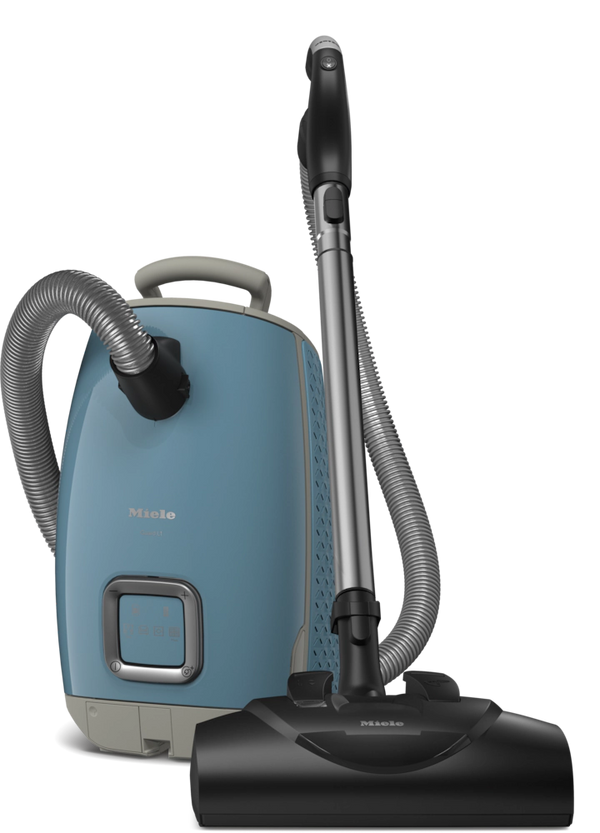
These Miele product images help identify common vacuum styles. Read the model label on your own machine; appearance alone does not confirm compatibility or service availability.

Bagged canister: bring the hose, wand and head when pickup is the issue.

Have the exact model label ready; tools and bags differ by configuration.

Bagless canister: note the filter-care history and any airflow changes.

Bring the charger and floorhead for charging or performance concerns.

Note the charging behaviour and which cleaning mode is affected.

Call before visiting; bring dock details for charging problems.
Weak Suction or Poor Pickup?
Miele issues often come down to bag seating, filter restriction, hose leaks, clogs, worn seals, or floorhead problems before they become major repairs.
Powerhead, Brushroll, or Floor Tool Problem?
Electric nozzle behavior, brushroll drive issues, wiring/contact faults, and floor-tool mismatch are some of the most common Miele service triggers.
Battery, Charging, or Cord Rewind Issue?
Triflex / Duoflex batteries, charging paths, cord rewinders, and hose or wand-side electrical issues all need model-aware diagnosis.
Robot or Appliance Support Needed?
Call with the model before bringing a Scout robot, coffee machine or other appliance. We can confirm the available support and what to bring.
Miele Repair Help Across VA, DC & MD
Whether you live in Northern Virginia, Washington, DC or Maryland, start with a call to our Fairfax or Leesburg team. We can discuss your symptoms, what to bring and the appropriate service location before you make the trip. These are our two physical stores; call to confirm arrangements for your machine.
- Repair: help with diagnosis, performance problems and service options
- Tysons, McLean and Great Falls: see our nearby repair guidance
- Buying advice: compare models and discuss replacement or trade-in options
- Warranty help: prepare proof of purchase and model/serial information
Choose Your Fairfax or Leesburg Store
Our Fairfax store is an option for customers travelling from Fairfax County, Tysons, Arlington, Alexandria and Washington, DC. Leesburg is an option for Loudoun County, Ashburn, Sterling and surrounding communities. Maryland customers can compare both routes using live directions. Choose the convenient store and call before travelling.
- Fairfax: 11110 Main St, Fairfax, VA 22030 — extension 1
- Leesburg: 300 Fort Evans Rd NE, Suite 104, Leesburg, VA 20176 — extension 2
- Call ahead to check parts availability if you are hoping for faster turnaround
Miele Models: Repair Enquiries & Preparation
We welcome enquiries about the families below. Repairability depends on the exact model, fault and availability of replacement parts, particularly for older or discontinued machines. Call first for cordless, robot and appliance enquiries.
| Miele Family | Common Models / Series | Common Issues | Best Next Step |
|---|---|---|---|
| Bagged Canisters | Guard L1 / M1 / S1, Complete C3, Compact C1, Classic C1, older S-series canisters | Bag seating, hose leaks, cord rewind, powerhead faults, filter restriction, worn floorheads | Bring the machine plus hose or floorhead if the issue is pickup-related |
| Bagless Canisters | Boost CX1, Blizzard CX1 | Filter care, dust path restriction, head performance, airflow loss, filter maintenance needs | Start with filter and airflow checks before assuming deeper failure |
| Uprights | Dynamic U1 and related upright families | Brush drive or floorhead issues, wand or hose path blockages, thermal shutoff | Bring the complete upright and describe where the issue occurs |
| Cordless | Triflex HX1 / HX2, Duoflex HX1 | Battery decline, charging problems, brushroll issues, head performance, airflow restriction | Bring the charger and the main head when possible |
| Robot Vacuums | Scout RX3, Scout RX2 | Docking, charging, navigation, filter care, brush maintenance | Send a photo of the model and the dock or bring the dock if the issue is charging-related |
Common Miele Problems & What to Bring
Weak Suction, Poor Pickup, or Reduced Airflow
A full or incorrectly seated bag, restricted filter, blockage, hose leak or floor-tool issue can cause poor pickup. Check the care instructions for your exact model. If performance remains poor, bring the complete airflow path—machine, hose, wand and floorhead—for inspection. Our Miele bags, filters and parts guide can help with supply identification.
Powerhead or Electric Nozzle Problems
Miele powerhead issues often live in the nozzle, wand, hose handle, or connection chain rather than the main canister body. If the problem is clearly in the floorhead path, bringing the full floor tool setup speeds the diagnosis dramatically.
Battery and Charging Issues on Triflex / Duoflex
For Triflex and Duoflex charging or runtime problems, bring the machine, charger and relevant floorhead. Note whether the issue occurs immediately, only in a particular mode, or after several minutes. Call before bringing in a damaged or swollen battery.
Scout Robot Docking, Charging, and Maintenance Issues
For a Scout robot with docking, charging or navigation problems, have the exact model and a description of any messages ready. Bring the dock if charging is the concern. Call first to confirm service and parts options for your generation of Scout.
Warranty, Parts, or Repair? Here’s the Fastest Route
Not every issue needs the same solution. Have your model number ready so we can help you decide whether to check supplies, arrange an inspection or prepare a warranty enquiry.
- Use warranty: when you have proof of purchase and suspect a covered issue
- Use repair: when the machine clearly needs diagnosis, labor, or testing
- Use parts / consumables: when the issue may really be bags, filters, hoses, floorheads, or accessories
- Use dealer / upgrade path: when the machine may no longer justify repair
Selected Miele Appliance Support
For a Miele coffee machine or household appliance, call with the exact model and symptom to confirm the support available before transporting equipment or booking a visit. Vacuum repair services do not imply that every appliance repair is offered at both stores.
- Miele coffee-machine enquiries and care products
- Call to confirm washer or dryer support and parts options
- Have your model and serial number ready when calling
Miele Repair Reference: Find Your Model & Symptom
Use these two diagnosis directories to organize a repair enquiry. Each connects a model family to symptoms, owner checks, service decisions and official Miele references. It does not identify a failed part remotely.
Start with the label: record the full model/type, serial number, exact message, fitted head or accessory, and when the symptom occurs. These entries cover named families and example variants, not every historical model or regional version. Match the manual to your exact machine before following a procedure.
1. Miele Vacuum Repair Diagnosis Directory
Choose the family below. Package names such as Cat & Dog, HomeCare and Pro can change the tools supplied; confirm the label and attached head rather than selecting parts by name alone.
Bagged Canister Check Sequence
- Switch off and unplug before inspecting the bag, filters or accessible attachments.
- Check the correct bag is fitted and seated. Replace a full or restricted disposable bag; do not empty and reuse it.
- Inspect the motor-protection and exhaust filters as instructed in your manual.
- Check the permitted accessible air path for obstruction. Do not insert objects into electrical connectors or open the casing.
- If the unit shut itself off from overheating, remove the restriction and allow it to cool as Miele directs—approximately 30 minutes in its canister shutdown guidance. Repeated shutdown needs service.
See Miele bagged-vacuum care and Miele shutdown guidance. Stop using a machine with damaged wiring, smoke or a burning smell.
Open Vacuum Model & Symptom Directory — 17 Entries
Guard L1
Identify: Cat & Dog, Electro+, AllFloor and other L1 packages.
Record the complete L1 model designation and fitted floorhead. A head or filter used on another Miele family is not automatically compatible. If a display or connectivity feature is involved, note the exact message separately from cleaning performance.
| Symptom to report | Owner observation or check | When to request service |
|---|---|---|
| Poor pickup | Does it affect carpet, hard floors or both? Note the fitted tool. | If the bagged-canister checks below do not resolve it. |
| Powerhead stops or will not run | Record the head model and whether suction continues. | Bring the canister, hose, wand and electric head for testing. |
| Display or connection concern | Photograph the message; identify whether the vacuum still cleans. | Use the exact L1 manual; call if the message persists. |
Reference: Miele troubleshooting · Find your exact model manual
Guard M1
Identify: M1 configurations, including Cat & Dog.
Identify the full M1 designation before selecting bags, filters or accessories. When describing a fault, separate airflow at the hose from pickup at the floor tool; this helps define what needs to be inspected.
| Symptom to report | Owner observation or check | When to request service |
|---|---|---|
| Weak pickup | Record the bag/filter type and last replacement. | Persistent reduction after the applicable owner-care checks. |
| Head issue | Note whether the fitted head is electric, air-driven or suction-only. | Call with its model number; do not assume a motor fault. |
| Stops during use | Record elapsed running time and any warning indication. | Repeated shutdown after the correct cooling and airflow checks. |
Reference: Miele troubleshooting · Find your exact model manual
Guard S1
Identify: S1 configurations.
Provide the S1 model label and tool designation. Avoid choosing supplies solely by the Guard name; use the operating manual and exact fitment information.
| Symptom to report | Owner observation or check | When to request service |
|---|---|---|
| Low airflow | Check whether maintenance is due using the exact manual. | Bring the full airflow path if the issue remains. |
| Cord will not retract | Note whether it retracts partly or not at all. | Stop pulling or forcing it; a cord reel needs assessment. |
| No start or intermittent power | Describe switch behaviour and cord condition without flex-testing a damaged cord. | Damaged cables or intermittent electrical operation need service. |
Reference: Miele troubleshooting · Find your exact model manual
Complete C3
Identify: HomeCare, Cat & Dog, Marin and other C3 packages.
C3 packages use different heads and controls. Give both the canister designation and head model. A running suction motor does not establish that the hose, wand and powerhead electrical path is working.
| Symptom to report | Owner observation or check | When to request service |
|---|---|---|
| Suction works; electric head does not | Record any head light and whether the brush is obstructed. | Bring all electrical attachments for the technician to isolate the fault. |
| Full-bag indication or poor airflow | Note when the bag was changed and what material was collected. | An indicator reading alone does not identify the failed component. |
| Cord, switch or handle problem | Identify the affected control and when the fault occurs. | Have electrical or cord faults inspected before further use. |
Reference: Miele troubleshooting · Find your exact model manual
Complete C2
Identify: C2 model variants.
Use the full C2 label rather than appearance to identify the machine. Note the fitted hose, wand and head when seeking accessory or repair advice.
| Symptom to report | Owner observation or check | When to request service |
|---|---|---|
| Poor pickup | Distinguish the floor-tool result from general loss of airflow. | Persistent problems after manual-approved care. |
| Unusual sound | Record whether it is from the canister or head. | Stop for grinding, burning smell or visible damage. |
| Accessory fit or air leak | Describe which joint is loose or damaged. | Have the model and connector checked before ordering. |
Reference: Miele troubleshooting · Find your exact model manual
Classic C1
Identify: Pure Suction, Turbo Team, HomeCare and other packages.
The package name matters: a turbo tool is not an electric powerhead. Record the head designation so a brush that stops turning is investigated in the correct way.
| Symptom to report | Owner observation or check | When to request service |
|---|---|---|
| Air-driven brush not turning | Report whether airflow is also reduced and whether hair is visible. | Bring the head if permitted owner cleaning does not help. |
| Poor pickup | Use the shared bagged-canister check sequence. | Have remaining airflow or seal concerns inspected. |
| Wrong bag or lid will not close | Compare the bag identification with the exact manual. | Do not force the lid or operate without the correct bag. |
Reference: Miele troubleshooting · Find your exact model manual
Compact C1
Identify: Turbo Team, HomeCare and other Compact C1 versions.
Compact C1 and Classic C1 are separate identifiers. Give the full designation when requesting bags, filters, hoses or service; the C1 name alone is insufficient.
| Symptom to report | Owner observation or check | When to request service |
|---|---|---|
| Reduced airflow | Record the installed supply references and maintenance history. | Request inspection if approved maintenance does not restore performance. |
| Tool or wand connection issue | Identify the connection that will not lock. | Check exact fitment before buying a replacement. |
| Brush stops | Record the tool model and visible debris. | Use the tool manual; persistent brush issues need assessment. |
Reference: Miele troubleshooting · Find your exact model manual
Compact C2
Identify: Compact C2 variants.
Confirm the complete nameplate designation and included head. Record whether the concern follows a floor-tool change or occurs with every attachment.
| Symptom to report | Owner observation or check | When to request service |
|---|---|---|
| Pickup varies by attachment | List the affected floor and tool. | Bring the problem attachment with the machine. |
| Intermittent powerhead | Note suction versus brush behaviour. | Electrical attachment testing is a service task. |
| Suction loss or hot body | Follow the shared airflow and shutdown guidance. | Repeated heating or shutdown requires inspection. |
Reference: Miele troubleshooting · Find your exact model manual
Older S-Series Canisters
Identify: S2, S4, S5, S6, S8 and earlier labelled S-series machines.
Record the full S-number from the label, not just the colour or a remembered retail name. Parts availability must be checked individually. Age alone does not determine whether repair is worthwhile.
| Symptom to report | Owner observation or check | When to request service |
|---|---|---|
| Suction or noise change | Report maintenance history and when the change started. | Ask for an inspection and parts-availability check. |
| Cracked hose or loose connection | Photograph the connector and model label. | Fitment must be verified before ordering. |
| Cord or motor concern | Describe the symptom without opening the casing. | Compare an assessment, parts availability and replacement options. |
Reference: Miele troubleshooting · Find your exact model manual
Dynamic U1 / S7000 Uprights
Identify: U1 and S7 upright variants.
Bring the complete upright. Distinguish low airflow through the hose from reduced pickup at the floor; the symptom location helps determine the inspection path.
| Symptom to report | Owner observation or check | When to request service |
|---|---|---|
| Floor pickup poor; hose works | Record brush behaviour and the floor type. | Brush-drive or lower-path inspection may be needed. |
| Low airflow at hose and floor | Consult the model manual for bags, filters and accessible restrictions. | Request service if owner maintenance does not resolve it. |
| Brush stops or unusual noise | Switch off and unplug before inspecting visible debris. | Do not open the drive housing or repeatedly restart an obstructed head. |
Reference: Miele troubleshooting · Find your exact model manual
Boost CX1
Identify: Pure Suction, Parquet, Cat & Dog and other packages.
Boost uses a different filter-care procedure from Blizzard and Triflex. Match your filter configuration to the specific Boost instructions.
| Symptom to report | Owner observation or check | When to request service |
|---|---|---|
| Reduced suction | Empty the container and follow Boost-specific filter and airway care. | Persistent loss needs inspection. |
| Performance falls after cleaning | Check that maintained parts were fully dried and reinstalled as instructed. | Stop if incorrect cleaning or damage is suspected. |
| Floorhead not cleaning | Identify the exact head and floor type. | Bring the head with the canister. |
Reference: Miele troubleshooting · Find your exact model manual
Blizzard CX1
Identify: Pure Suction, Turbo Team, Cat & Dog and other packages.
Use Blizzard instructions for the dust container, filter frame and fine-dust system. Do not transfer a Boost or cordless filter-cleaning procedure to this machine.
| Symptom to report | Owner observation or check | When to request service |
|---|---|---|
| Reduced pickup | Follow Blizzard-specific container and filter care. | If airflow stays poor, request an assessment. |
| ComfortClean concern | Record the indicator colour and when the cleaning cycle occurs. | Use Miele’s matching indicator article before calling. |
| Stops or becomes unusually hot | Follow the shutdown guidance below. | Persistent shutdown after maintenance needs service. |
Reference: Miele troubleshooting · Find your exact model manual
Triflex HX1 — Original
Identify: Original HX1, Cat & Dog, Pro and related configurations.
Identify whether yours is the original HX1 or HX1 Facelift. Miele separates their filter-care procedures. Give the battery and charger references as well as the vacuum model.
| Symptom to report | Owner observation or check | When to request service |
|---|---|---|
| Reduced suction | Use the original-HX1 filter procedure in the linked Miele article. | Persistent loss after correct care requires inspection. |
| Short runtime | Record mode, attachment, approximate runtime and charge indication. | Have battery condition evaluated; runtime alone is not a diagnosis. |
| Brush or charging issue | Record warning lights and charger details. | Bring machine, charger and head; confirm battery fitment first. |
Reference: Miele troubleshooting · Find your exact model manual
Triflex HX1 Facelift
Identify: HX1 Facelift variants.
Miele groups HX1 Facelift with HX2 in its filter-care article. Verify your label before following original-HX1 instructions.
| Symptom to report | Owner observation or check | When to request service |
|---|---|---|
| Reduced pickup | Follow the HX1 Facelift/HX2 section of the source. | Request inspection if performance remains poor. |
| Dust filter difficult to remove | Confirm the release procedure in your manual. | Do not force the assembly; ask for help if it is stuck. |
| Stops during cleaning | Record indicator pattern, mode and head. | Persistent stopping needs model-specific assessment. |
Reference: Miele troubleshooting · Find your exact model manual
Triflex HX2
Identify: HX2, Pro, Cat & Dog, Sprinter and other packages.
Use HX2-specific care and battery/charger identification. Package colour or a shared Triflex name does not verify spare-part compatibility.
| Symptom to report | Owner observation or check | When to request service |
|---|---|---|
| Airflow drops | Follow the HX2 filter-care section; fine dust filters are not to be washed. | If correct care does not help, request assessment. |
| Short runtime or no charge | Record charge lights, mode and whether a second approved battery behaves differently, if available. | Bring the charger for testing; avoid buying a battery solely on symptoms. |
| Head stops | Switch off before checking permitted brush access. | Persistent failure or damaged connectors needs service. |
Reference: Miele troubleshooting · Find your exact model manual
Duoflex HX1
Identify: Duoflex HX1 and accessory-package variants.
Duoflex has its own dust and filter system. Miele specifies dry care for its prefilter and fine dust filter; do not use Triflex removal instructions.
| Symptom to report | Owner observation or check | When to request service |
|---|---|---|
| Suction and runtime decline | Follow the Duoflex ComfortClean, emptying and dry-care instructions. | Persistent symptoms require evaluation. |
| Will not start | Record the indicators and charging history. | Use the Duoflex-specific support article or call. |
| Brush blocked | Switch off before approved owner cleaning. | Do not force a stuck roller or operate with damaged parts. |
Reference: Miele troubleshooting · Find your exact model manual
Scout RX1 / RX2 / RX3
Identify: Scout generations, including Home Vision variants.
Identify RX1, RX2 or RX3 before interpreting a code or selecting a dock, filter or battery. Photograph the full message and note whether it appears on the robot or in the app.
| Symptom to report | Owner observation or check | When to request service |
|---|---|---|
| Cannot dock or charge | Record dock location, power indication and contact condition. | Follow the matching manual; bring dock details when calling. |
| Pickup falls | Check user-accessible brush, container and filter care for your generation. | Persistent mechanical issues need assessment. |
| Navigation, app or F-code | Record the exact code, generation and event preceding the fault. | Use the matching Miele support entry; codes are not universal. |
Reference: Miele troubleshooting · Find your exact model manual
Not listed? Call 703-997-9292 with the full model/type. An exact model assessment is needed before confirming a replacement part, warranty status or repair availability.
2. Miele Appliance Repair Diagnosis Directory
Choose the appliance type, then match the full model and serial number to its instructions. A model prefix narrows the search; it does not establish the fault.
Before booking: this is a reference and service-enquiry directory. Call AceVacuums to confirm which appliance support is available for your model and VA/DC/MD address. It does not promise that every appliance is repaired in-store or that home visits are available throughout the region.
Keep built-in and large appliances installed until a service provider gives instructions. Restrict owner checks to the operating manual. Gas, mains wiring, refrigerant, internal microwave and pressure-system repairs require appropriately qualified service.
Open Appliance Model & Symptom Directory — 12 Entries
W1 & Other Miele Washers
Identify: W-number models; record the complete designation and serial number.
Describe load size, programme, water left in the drum and the full fault text. Do not order a pump from a code alone.
| Symptom to report | Owner observation or check | When to request service |
|---|---|---|
| No start or dark display | Note whether the controls respond and whether the door closes. Check user controls and supply only as the manual permits. | Persistent power or door-lock issues need a technician. |
| Water remains or programme stops | Write down the exact inlet/drain message and stage of the cycle. | Use the model’s troubleshooting procedure; never force a locked door. |
| Leak or repeated technical fault | Stop the programme and record the message. | Do not keep restarting a leaking appliance; arrange appropriate service. |
Reference: Miele troubleshooting · Find your exact model manual
T1 Heat-Pump & Other Miele Dryers
Identify: T-number models; distinguish heat-pump, condenser and vented designs.
Provide the dryer type and any drain connection details. Do not apply a vented-dryer diagnosis to a heat-pump model.
| Symptom to report | Owner observation or check | When to request service |
|---|---|---|
| Drying takes longer | Record programme, load and whether filters need manual-approved care. | Persistent poor drying after correct care needs assessment. |
| Container/filter warning | Note the exact display wording. | Follow only the procedure for your dryer type. |
| Stops, no heat or unusual noise | Record whether the drum runs and when the fault appears. | Internal heating, refrigerant or electrical work requires service. |
Reference: Miele troubleshooting · Find your exact model manual
G 7xxx & G 5xxx Discovery Dishwashers
Identify: Identify the exact G-number and manufacture details; F11 guidance differs for Discovery models from 2019.
Report AutoDos, AutoOpen or other options only if fitted. Record the precise message rather than just saying the dishwasher is broken.
| Symptom to report | Owner observation or check | When to request service |
|---|---|---|
| F11 with standing water | Use the generation-specific Miele article linked below. | Persistent drain faults need service; a code does not prove pump failure. |
| Poor wash or drying | Record programme, detergent, loading and any spray-arm message. | Consult the model’s care instructions before replacing parts. |
| F70 or water leakage | Stop use and consult the Waterproof-system guidance. | Arrange service; do not defeat the protective system. |
Reference: Miele troubleshooting · Find your exact model manual
G 1xxx–G 6xxx & Older Dishwashers
Identify: Confirm the complete G-number; use separate F11 guidance for the listed older generations.
Older parts availability and the condition of the appliance matter. Request a model-specific assessment before choosing repair or replacement.
| Symptom to report | Owner observation or check | When to request service |
|---|---|---|
| F11 with water in cabinet | Follow the older-generation article; its accessible drain arrangement differs. | Persistent problems need inspection; avoid reaching into hidden debris. |
| Inlet/drain indicator | Record whether it fails while filling or draining. | Use the exact model manual; do not assume every light means the same fault. |
| Door or visible leak issue | Record where water appears without removing built-in panels. | Call for service before running another cycle. |
Reference: Miele troubleshooting · Find your exact model manual
CM Countertop Coffee Machines
Identify: CM 5xxx, 6xxx, 7xxx and related models.
Give the exact CM number. Built-in CVA and countertop CM procedures are not automatically interchangeable.
| Symptom to report | Owner observation or check | When to request service |
|---|---|---|
| Coffee slow or not dispensed | Record the drink, message and maintenance history. | Use your model’s cleaning programme; persistent faults need assessment. |
| Milk not drawing or frothing | Identify the milk system and message. | Follow the exact model’s milk-system care instructions. |
| Brew unit stuck or fault displayed | Record the full message; do not force the mechanism. | Consult the matching CM support article and request service if unresolved. |
Reference: Miele troubleshooting · Find your exact model manual
CVA Built-In Coffee Machines
Identify: CVA 4xxx, 5xxx, 6xxx, 7xxx and other labelled models.
Call to confirm service arrangements before dismantling cabinetry or transporting a built-in appliance.
| Symptom to report | Owner observation or check | When to request service |
|---|---|---|
| Water/container message | Identify whether your machine uses a tank or a plumbed supply. | Follow the corresponding CVA guidance. |
| No milk or dispensing problem | Record the fitted system and cleaning prompt. | Use the exact built-in model’s care programme. |
| Brew mechanism or repeated F-code | Photograph the message and note the programme stage. | Do not remove the built-in unit or force a stuck assembly. |
Reference: Miele troubleshooting · Find your exact model manual
H Ovens & HR Ranges
Identify: Exact H- or HR-number; identify electric or gas equipment.
Range-specific concerns should use the Cooking support selector and exact HR manual. For gas smell, leave the area and contact the gas utility or emergency service from a safe location.
| Symptom to report | Owner observation or check | When to request service |
|---|---|---|
| Will not heat | Record selected mode, displayed temperature and any lock/demo indication. | Internal heaters, sensors, controls and wiring require a technician. |
| Uneven results | Record cooking mode, rack position and cookware. | Compare the operating instructions before assuming an element fault. |
| Door, lock or repeated error | Record whether the issue follows a cleaning cycle. | Allow safe cooling; do not force a locked door. |
Reference: Miele troubleshooting · Find your exact model manual
DG / DGC Steam & Combination Steam Ovens
Identify: Exact DG/DGC model; tank and plumbed versions need different checks.
Allow hot water and steam components to cool. Do not open internal covers or disconnect a built-in water supply for exploratory diagnosis.
| Symptom to report | Owner observation or check | When to request service |
|---|---|---|
| Water or steam message | Record tank/inlet wording and the selected mode. | Follow the exact model’s water-system instructions. |
| Descaling interrupted | Record the stage and displayed prompt. | Continue only as the manual directs; do not improvise chemicals. |
| No heat, persistent fault or unusual leakage | Stop and record the symptoms. | Boiler, pressure, internal water and electrical repairs require service. |
Reference: Miele troubleshooting · Find your exact model manual
KM Cooktops
Identify: Exact KM number; identify induction, radiant electric or gas.
Record the full display code. A code on an induction unit must not be interpreted using a gas or radiant model’s chart.
| Symptom to report | Owner observation or check | When to request service |
|---|---|---|
| Control lock or non-response | Record displayed symbols and whether all zones are affected. | Use the exact manual to distinguish a setting from a fault. |
| Induction pan not detected | Record the zone and cookware used. | Check the manual’s cookware requirements before requesting parts. |
| Cracked glass, electrical fault or gas issue | Stop use. | Arrange qualified service; do not open or bridge controls. |
Reference: Miele troubleshooting · Find your exact model manual
K / KF / F Refrigeration & Wine Units
Identify: Exact model; identify refrigerator, freezer, combination or wine-storage appliance.
Do not remove sealed-system covers or attempt refrigerant work. Report model, alarm text and how long cooling has been affected.
| Symptom to report | Owner observation or check | When to request service |
|---|---|---|
| Temperature alarm or poor cooling | Record actual displayed temperatures, settings and recent door openings. | Persistent warming needs prompt service; protect temperature-sensitive food. |
| Door or condensation concern | Note seal condition and where moisture appears. | Use the matching care guidance; persistent issues need assessment. |
| Ice-maker or water problem | Record the exact message and whether the model has a water connection. | Confirm the appropriate support path before replacing parts. |
Reference: Miele troubleshooting · Find your exact model manual
DA Ventilation Hoods
Identify: Exact DA model; distinguish extraction from recirculation.
Tell the service provider whether air is ducted outside or recirculated; this changes the relevant checks.
| Symptom to report | Owner observation or check | When to request service |
|---|---|---|
| Extraction seems weak | Record mode, speed and whether filters need permitted care. | Persistent airflow issues may require installation or appliance assessment. |
| Filter indicator | Check the model’s maintenance and indicator instructions. | Resetting an indicator is not a substitute for required care. |
| Fan, light or control failure | Record which functions still work. | Electrical or inaccessible components need service. |
Reference: Miele troubleshooting · Find your exact model manual
M / H Microwave & Combination Models
Identify: Exact model; distinguish a microwave from a combination oven.
Microwave components can remain hazardous after unplugging. This entry is for symptom reporting and user settings, not internal repair instructions.
| Symptom to report | Owner observation or check | When to request service |
|---|---|---|
| No start | Check permitted user settings, timer/lock state and door closure. | Persistent faults need service. |
| Runs but does not heat | Record mode, cookware and whether combination modes differ. | Internal microwave diagnosis is technician-only. |
| Sparking, damaged door or abnormal smell | Stop use. | Do not remove the casing; request qualified assessment. |
Reference: Miele troubleshooting · Find your exact model manual
Fault-Code Cross-Check: Verify the Appliance & Generation
| Symptom to report | Owner observation or check | When to request service |
|---|---|---|
| Dishwasher F11 — G 1xxx–G 6xxx | Water remains / drainage concern. Use the older-generation reference. | Miele older-generation F11 guide |
| Dishwasher F11 — G 7xxx and G 5xxx Discovery from 2019 | Use the separate guide for the applicable newer design. | Miele newer-generation F11 guide |
| Dishwasher F70 | Waterproof-system fault: follow the protective response in Miele’s article. | Miele F70 guidance; arrange service. |
| Any other F-code or indicator | Record appliance, complete model, serial number and the entire message. | Look up the exact manual; do not use another appliance’s code chart. |
Directory references checked October 15, 2026. These are preliminary symptom guides, not confirmed diagnoses or promises of parts availability. Miele manual finder · Miele customer assistance
Before You Bring Your Miele In
Call → identify the model → confirm what to bring → visit for assessment.
- Cost: ask about any assessment charge and the estimate process for your machine before leaving it for service.
- Turnaround: ask about current workload and parts availability. An initial phone discussion is not a confirmed completion date.
- Warranty: bring proof of purchase and model/serial details. Coverage depends on the applicable terms and assessment.
- Repair or replace: compare the likely repair scope, parts availability, condition and replacement options before deciding.
- After repair: ask about the written parts and labour coverage applicable to your work.
What to Bring for Faster Miele Repair Intake
Bagged Canisters & Uprights
Bring the full machine and, if the issue seems tied to pickup, the floorhead or powerhead. If you suspect the hose or wand chain is part of the issue, bring those too. A photo of the current bag or filter can also help if fitment is unclear.
Cordless Models
Bring the charger, main head, and the battery if removable. Charging and runtime issues are much easier to isolate when the full power chain is present.
Scout Robot Models
If the issue is charging or docking, bring the dock or send a photo of it first. If the problem is navigation or maintenance, a clear note about the exact behavior helps more than a long story.
Selected Appliances
For coffee machines, washer / dryer questions, and other appliances, start with the model and serial label plus a one-sentence symptom. Appliance support moves much faster when the exact model is identified first.
Genuine Miele Bags, Filters & Floor Tools
A performance problem may involve a supply or accessory. These examples show the items to identify when calling. They are not universal replacements or a diagnosis of your machine.

Example bag type. Check your model and bag collar before ordering.

Filters are model-specific; this filter does not fit every Miele.

Bring the hose and wand as well as the head for an electrical fault.

Electrical connections and hose fit vary by exact model.

Battery compatibility and service options require model verification.

An air-driven brush needs a different diagnosis from an electric head.
Explore More Miele Help
Get Real-Time Traffic & Directions
AceVacuums Fairfax
Fairfax store details · Call 703-997-9292, extension 1
11110 Main St, Fairfax, VA 22030
Best first stop for Fairfax County, Tysons, Arlington, Alexandria, Falls Church, Merrifield, and many DC-side routes.
Strong local Miele repair intake, warranty follow-up, parts support, and premium ownership help.
Get Real-Time Traffic & DirectionsAceVacuums Leesburg
Leesburg store details · Call 703-997-9292, extension 2
300 Fort Evans Rd NE, Suite 104, Leesburg, VA 20176
Best first stop for Loudoun, Ashburn, Sterling, and surrounding western communities.
Useful for western DMV customers who want local Miele repair access, parts, and warranty follow-up.
Get Real-Time Traffic & DirectionsMiele Repair FAQs
Can you help with older Miele vacuum models?
Call with your model number. We can discuss older canisters and current Miele families, but repair options depend on the fault, condition and parts availability. We will help identify the next step before you travel.
Do you offer same-day Miele repair?
Some straightforward repairs may be completed the same day when the correct parts and technician capacity are available. Call with your model and symptoms to check; turnaround is confirmed after assessment.
What is the most common cause of weak suction on a Miele?
Possible causes include a full or incorrectly seated bag, a blocked hose, restricted filters, an air leak or a floorhead fault. An inspection can distinguish maintenance needs from a repair. Use the correct bag and filters for your exact model.
Do you help with Triflex batteries and Scout robot issues?
Call first with your Triflex, Duoflex or Scout model and symptoms. Battery, charger, dock and other service options vary by model and parts availability; we can advise what to bring.
Do you also help with Miele coffee machines and selected appliances?
Contact us with the appliance model and symptom to confirm the support available. See our Miele appliance information for the appropriate next step.
Which store should I use first?
Compare live directions to Fairfax and Leesburg, then call if you need help choosing a store. Tell us where you are travelling from and what needs service. Both stores are in Virginia and welcome enquiries from VA, DC and Maryland customers.
Need Miele Repair, Parts, or Warranty Help in VA, DC, or MD Today?
Call with your Miele model, symptoms and the store you plan to visit. Our Fairfax and Leesburg teams can help with repair enquiries, genuine parts and warranty preparation for customers throughout Virginia, Washington, DC and Maryland.
Call 703-997-9292 with the model number and symptoms before visiting.
Your Local Vacuum & Central Vacuum Specialists
Visit AceVacuums in Fairfax and Leesburg, Virginia, for expert buying advice, repairs, warranty support, and replacement parts.
Expert Repairs & Service
- • Belt and brush-roll replacement
- • Motor diagnosis and repair
- • Suction loss and clog removal
- • Bag and filter replacement
- • Central vacuum installation and repair
- • Free repair estimates
Brands We Service
- • Miele, SEBO, Dyson & Riccar
- • Shark, Bissell & Hoover
- • Kirby, Oreck & Simplicity
- • Electrolux
- • MD & BEAM central vacuums
- • Austin Air & Blueair air purifiers
Northern Virginia
- • Fairfax, Burke, Vienna & McLean
- • Reston, Herndon & Chantilly
- • Ashburn, Leesburg & Sterling
- • Purcellville & Aldie
- • Woodbridge, Manassas, Gainesville & Bristow
- • Alexandria & Arlington
Washington, DC & Maryland
Welcoming customers from Washington, D.C., Montgomery County, and Prince George’s County, Maryland. Contact our team for showroom directions or to arrange central vacuum service.
Hablamos Español — Service in English & Spanish.